A HIPAA-compliant home office means you (therapist, counselor, psychologist, or other healthcare professional) are required to protect your patients’ or clients’ protected health information (PHI). This could involve enforcing technical and administrative policies and other safeguards, including password-protecting file-handling systems.
Key takeaways
- Physical safeguards are required to protect PHI in a HIPAA-compliant home, such as secure technology, policies, and a documented risk analysis.
- Common risks in home offices include individuals within earshot, unsecured WiFi, and the use of technological tools without a BAA (Business Associate Agreement).
- Although telehealth at home is allowed, you should always confirm that the telehealth platform you use is HIPAA-compliant.
What is HIPAA and why does it matter for remote work?
The Health Insurance Portability and Accountability Act (HIPAA) is the federal law that sets standards for protecting sensitive information, including medical records and other individually identifiable health information. The HIPAA Privacy Rule governs the use and disclosure of protected health information (PHI). The HIPAA Security Rule applies specifically to electronic protected health information (ePHI) and requires administrative, physical, and technical safeguards.
Who must comply when working from a home office?
A HIPAA-covered entity is an individual, usually a therapist, counselor, psychologist, or psychiatrist, who electronically transmits specified health information in the course of standard transactions (e.g., billing). Business associates, which can typically be healthcare staff who transmit this information on your behalf, are also regulated under HIPAA.
That means if you’re:
- Sharing assessments, reviewing lab results, or accessing client records on your laptop
- Writing progress notes in your dining room
- Conducting telehealth sessions in a spare bedroom
- Accessing scheduling or billing information remotely
…you will still need to protect your patient’s PHI. If you’re building or growing a private practice, working with a platform like Grow Therapy means your telehealth tools, billing systems, and client communications are already designed to be HIPAA-aligned — reducing the administrative burden of configuring each vendor independently.
Protected health information in a home setting
Being at home doesn’t mean that you aren’t still handling PHI. In an at-home office, PHI can include:
- Billing records, invoices, insurance information, superbills
- Printed documents that are in a visible workspace
- Downloaded files on your computer, saved files that are backed up in cloud storage.
- Appointment reminders that are sent via email, text, or through an electronic health record (EHR)
- Intake forms, treatment plans, or psychotherapy notes
Rule of thumb: Any identifying information that can be traced should be protected.
Core HIPAA rules impacting home offices
HIPAA requirements don’t change when you move from a clinic to a home office but the risks do. Here’s how the core rules apply in a remote work environment.
Privacy Rule requirements in a home environment
The HIPAA Privacy Rule grants clients access to their records. The Notice of Privacy Practices (NPP) establishes strict limits on PHI disclosure and sets a national standard for the protection of client PHI.
In an office setting, this translates into questions such as:
- Is someone within earshot of the telehealth session?
- Are paper files stored in a place where others can access them?
- Are you using the minimum amount of PHI needed to complete a task?
- Is your laptop screen visible to others, such as a spouse, child, or roommate?
Security Rule obligations for remote work
The HIPAA Security Rule mandates that covered entities and business associates safeguard ePHI by ensuring its confidentiality, integrity, and availability. It specifically obligates the implementation of administrative, physical, and technical safeguards.
When it comes to remote work, this simply means your home office should:
- Be secured
- Be accessible remotely
- Be capable of transmitting information
- Address who can physically access your workspace
- Enforce protocol if a device is lost, stolen, or compromised
Breach Notification Rule considerations for home offices
The HIPAA Breach Notification Rule requires notification following a breach of unsecured PHI. In many cases, affected individuals must be notified without unreasonable delay and no later than 60 days after discovery. Covered entities must also notify the Department of Health and Human Services (HHS), with the timing depending on the size of the breach.
This can include a wide and diverse range of circumstances, but here are some examples of home-office incidents that could trigger a breach:
- A psychiatrist steps away from their workstation unattended, leaving their chart accessible.
- A laptop containing client information without password protection is lost.
- A therapist checks records using a library’s public WiFi without internet safeguards.
- A psychologist discusses sensitive information in a setting where others can hear.
- A printed intake packet is left in a shared area.
Minimum necessary standard when working from home
The “minimum necessary” rule requires limiting PHI use, disclosure, and requests to only what is needed to complete a task, unless an exception applies.
Again, this can include a variety of real-world situations, but some common examples include:
- Only opening a client’s charts when needing clinical information, not for scheduling or billing
- Only printing documents when necessary
- Ensuring your screen is not visible to others
- Keeping PHI off of visible items such as sticky notes or whiteboards
Risk analysis and risk management for home offices
Understanding where your risks lie is the first step toward building a compliant home office setup. The following covers how to assess your environment and identify the most common vulnerabilities.
Conducting a home office security risk assessment
A common mistake is assuming EHR use ensures full protection. Simply having an electronic health record does not adequately safeguard PHI.
Under the Security Rule, HIPAA requires a risk analysis. This means identifying where ePHI is created, received, stored, or transmitted, and documenting any potential risks.
You can ask yourself the following questions:
- Are personal devices being used for work-related access?
- If my laptop was stolen, could someone access PHI?
- Is my WiFi secured with strong encryption and a unique password?
- Do I have a separate, password-protected guest WiFi for visitors to use?
- Where could unauthorized access happen?
- What if someone other than myself entered the workspace?
- How would I know if my accounts were compromised?
Identifying common home office vulnerabilities
Of course, each home office setup has its own unique attributes and characteristics. Even so, there are some common risks that frequently occur in a home office environment, including:
- Unsecured and/or public WiFi use (e.g., when you’re away from your home office’s secure network)
- No separate guest WiFi network for visitors and other non-staff members in your home office
- Passwords saved on a browser
- No multi-factor authentication (MFA)
- Smart speakers used for office sessions
- Email or text messaging without a BAA
- Improper disposal of printed PHI
In a home office environment, you should always operate on private, secure networks. For any times where you need to work outside of your home office, such as in a hotel room when you’re traveling, it’s best to rely on something like a secure data plan rather than a public WiFi network.
When disposing of PHI, you don’t have to be perfect, but you do need to be reasonable in creating a system that reduces risk. For example, if you print intake paperwork or progress notes, it might be a reasonable approach to keep a shredder in your home office as a safeguard to protect PHI.
Physical safeguards your home office needs
Physical safeguards are the foundation of a HIPAA-aligned home office — covering everything from how your workspace is secured to how devices and paper records are managed.
Securing the home workspace
Treat your home workspace as a clinical environment. Protect information at all times. Some best practices can include creating a dedicated workspace for your clinical work and locking it when not in use. Also, consider using a sound machine outside of the office when needed.
Paper records and printed PHI
Paper records pose risks in a home environment and require strict management.
If you print anything containing PHI, use a shredding machine to dispose of the documents and avoid taking printed records outside your workspace. Never leave PHI in a shared space and store files in a locked drawer or cabinet.
Device and media controls
Think of other electronic devices beyond your laptop.
In a typical home office setup, this can include:
- Phones used for secure messaging
- Tablets used for documentation
- External drives or USBs
- Printers/scanners with stored memory
- Backup devices
Only use practice-approved devices. Always plan for secure disposal, replacement, or loss.
Technical safeguards to consider for your home office
Technical safeguards address how ePHI is accessed, transmitted, and protected across your devices, network, and software — and are required under the HIPAA Security Rule for all remote providers.
Home networks and internet security
While in your home office, make sure you use WiFi Protected Access 2 or 3 (WPA2 or WPA3) encryption and that your router firmware is up to date, with a strong, unique password. Use a separate guest network for non-work devices, and only use private WiFi to access PHI.Access controls and authentication
HIPAA’s technical safeguards also include managing access to those who should have it. Not every user in your organization should have the same level of access.
At minimum, you should consider:
- Using unique usernames for each system or platform
- Verifying your identity by using Multi-factor Authentication (MFA) for your email, EHR, and telehealth tools
- Creating strong passwords and only saving passwords in browsers if permitted by your workplace
- Locking your computer whenever it’s left idle
- Securing ePHI when transmitting to prevent unauthorized access
- Prohibiting shared logins or credentials as part of your policy
When you send or access ePHI remotely, think about how it travels. Consider using:
- Secure, HIPAA-compliant email or messaging tools
- VPN access when required by your organization or technical system
- Encrypted telehealth platforms
- Client portals, whenever available
- Secure cloud storage with a BAA
Device security and endpoint protection
Protect the device itself, not just the apps on it. Use full-disk encryption with backup enabled and remote wipe capability to ensure security and protection of PHI. Also, keep your firewall enabled, and run antivirus/anti-malware software to limit potential breaches. Additionally, keep software up to date by enabling automatic updates.
Telehealth and remote patient interactions from home
Conducting telehealth from home introduces specific compliance considerations both in the platforms you choose and how you manage privacy during live sessions. All telehealth platforms that provide their services for covered providers must comply with HIPAA. HHS notes that these technology vendors must enter into a BAA in order to operate their platforms.
However, before using any telehealth platform, you should ensure:
- It supports encryption
- It offers a BAA
- It aligns with your documentation and retention workflow
- It is appropriate for your patient population and setting
- Maintains privacy during virtual visits at home
Even the home office environment can become non-compliant if privacy is compromised. Consider the following habits to decrease risk: confirming who is in your workspace, using headphones, and closing the door to reduce background noise. You should always try to avoid discussing client information where others can hear and turn off speakers and voice assistants.
Additionally, the use of privacy screens for computers and mobile devices can help protect PHI from being inadvertently exposed. It’s also a good idea to double-check for BAAs when using electronic devices and employ extra encryption protection when possible.
Preventing and responding to HIPAA incidents at home
When working remotely, healthcare professionals may face several common HIPAA risks. Here are some common home office HIPAA violations and how to avoid them:
- Not confirming vendor compliance and a BAA when using AI transcription or scheduling tools
- Conducting sessions in spaces where family members or roommates can overhear
- Leaving printed PHI or charts in plain view
- Not using a BAA when communicating with clients
- Using unsecured WiFi
- Not logging out of the EHR after use
- Storing PHI on personal devices without encryption
Breach notification requirements for remote workers
Sometimes breaches are reportable when there is disclosure or inappropriate use of a client’s PHI that compromises security. As a covered entity, you are required to assess and document the breach following the HIPAA breach notification requirements when applicable.
When a breach occurs, you are required to assess risk, confirm whether the data was unsecured PHI, issue notifications (to individuals, HHS, and, sometimes, the media) within strict timelines, ensure business associates report promptly, and document every step.
Final thoughts
Having a HIPAA-compliant home office is not just about having a laptop and a locked door. It’s about building a system that protects PHI and ensures ethical, compliant care. These requirements are intended to provide a system that reduces the risk of unauthorized access and supports modern providers in the way they work.
If you’re growing your practice and want support with the business side of care delivery — including HIPAA-aligned telehealth, billing, and scheduling infrastructure — Grow is built to support exactly that.
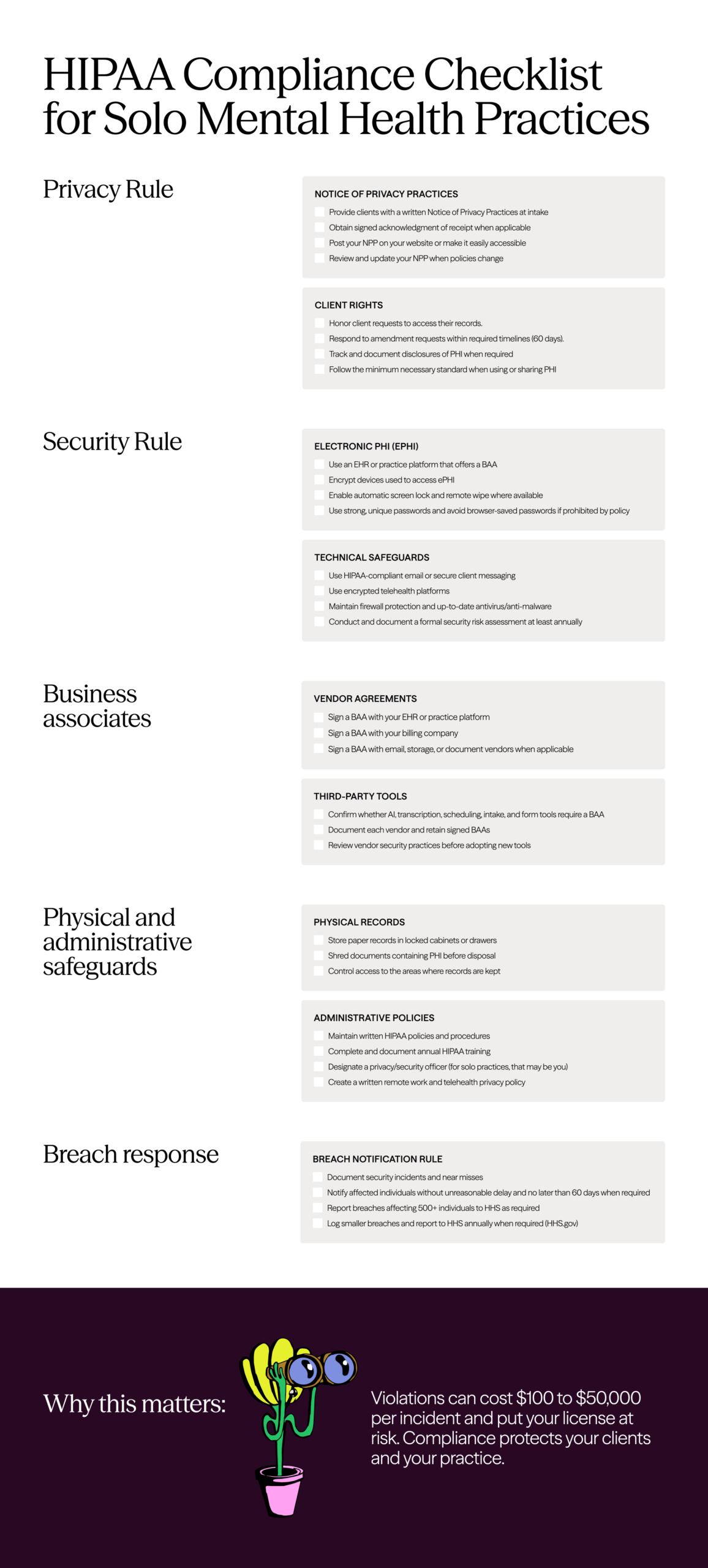
Use this practical checklist for a HIPAA-compliant home office